Agent governance policies
- Agents
- Governance
InstaCloud now supports project-level agent governance policies. Choose which operations your agent can run, which need human approval, and which are blocked. The same policy applies to agent-mode CLI requests and MCP tools; human requests keep their existing role-based permissions.
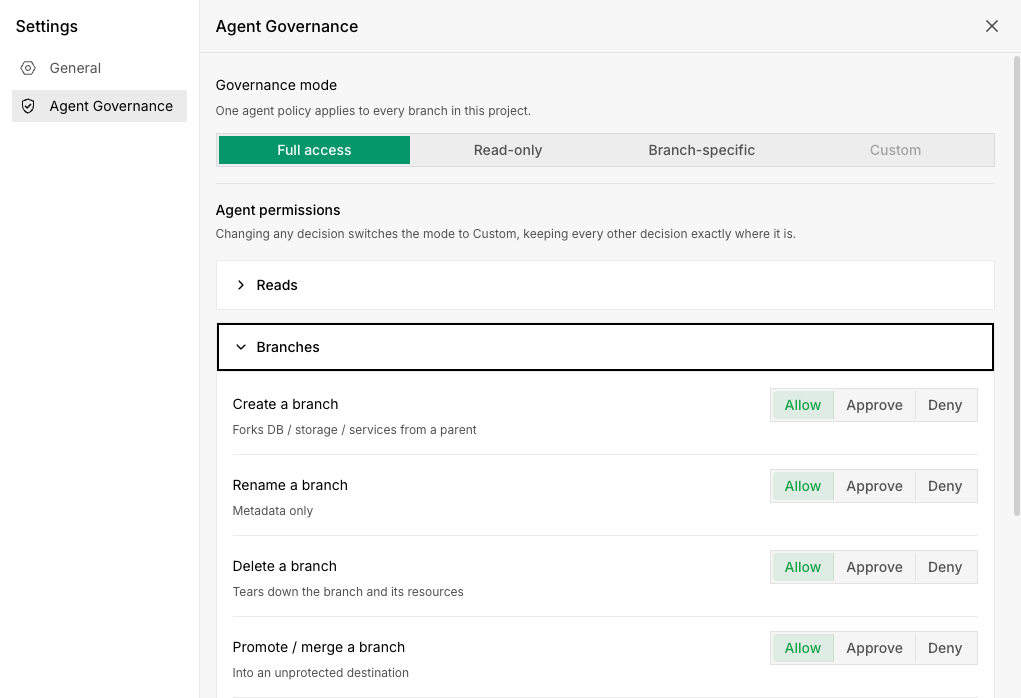
Choose how your agent works
- Full access: Allow classified project operations within the user's existing permissions. This is the default for new and existing projects.
- Read-only: Block operations classified as mutations while allowing reads, including sensitive credentials.
- Branch-specific: Let agents develop on unprotected branches, block classified writes to protected branches, and require approval for operations such as deleting services or changing capacity.
- Custom: Set individual eligible actions to Allow, Approve, or Deny. Protected-branch writes remain blocked.
Select protected branches explicitly; main is not protected automatically. A human project admin can configure the policy in the console or CLI. For example, to allow development on other branches while protecting main:
insta agent-policy set branch-specific
insta agent-policy protect-branch main
Review requests before they run
When an operation needs approval, it pauses for a human admin to review. Approval authorizes one exact request once. The agent then retries the unchanged command; changing the resource or parameters requires a new approval. Agents cannot approve their own requests, and restricted modes prevent them from changing their policy or branch protection.
These policies govern operations through the official agent toolchains. Read-only mode and branch protection do not enforce SQL-level isolation: SQL queries are not parsed for writes, and database credentials can permit direct access.