Scoped API tokens for scripts and CI
- Access
- Security
You can now mint an API token and drive InstaCloud from a script or a CI job: create a project, add services, deploy, run SQL. The dashboard, the CLI and the MCP server all use the same REST API at api.instacloud.com, so anything they can do, a token can do too.
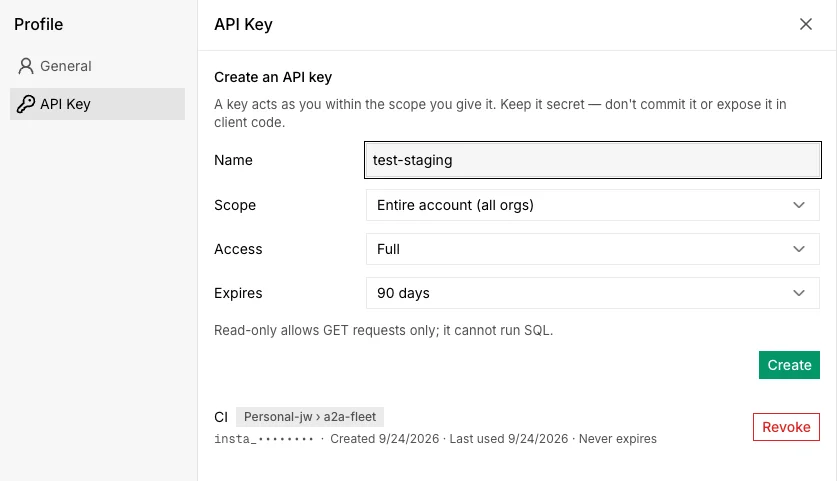
Scope, access and expiry
A token is bound to your account, to one organization and its projects, or to one project, and the scope is fixed when you create it. Access is full or read-only: a read-only token can list and inspect but not run SQL or change anything. Expiry defaults to 90 days, or never for a token you rotate yourself.
A token never exceeds its owner. Your organization role still applies, and leaving an organization revokes the tokens you minted there.
Create one
In the dashboard, open API Key under Profile. From a terminal, the same token is one command:
insta tokens create ci --project <id> --read-only --expires 30d
The plaintext is shown once. Both places list your keys and revoke them, and a revoked key stops working immediately. On a CI runner, insta login --api-key signs the CLI in with the token instead of a browser.
Call the API
Send the token as a bearer credential. This adds a Postgres service to a project:
curl -s -X POST https://api.instacloud.com/projects/$PROJECT/services \
  -H "Authorization: Bearer $INSTA_TOKEN" -H "Content-Type: application/json" \
  -d '{"type":"postgres","name":"db"}'
A request outside the token's scope answers 403 token_scope. The API reference says which scopes each endpoint accepts.